
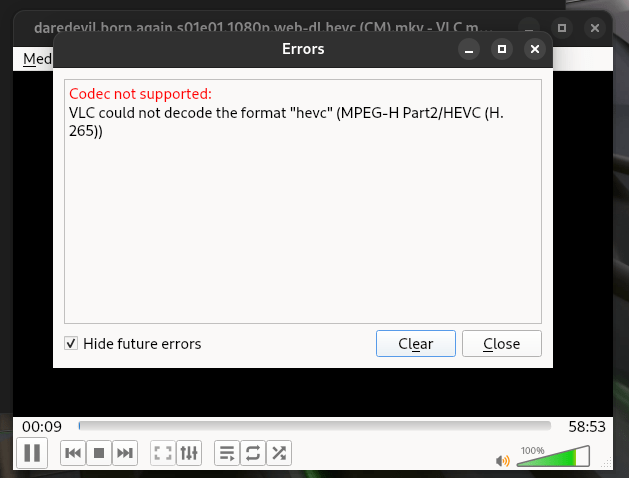
Fedora 41 ကို နေ့စဥ် အသုံးပြုနေတဲ့ ညီကိုမောင်နှမတွေ Video များကြည့်တဲ့အခါ မည်သည့် Player နဲ့မဆို Video file များ ဖွင့်မရ ရှိခဲ့သော် အခု နည်း အတိုင်း Package တွေ install နိုင်ပါတယ်။ ဒီလို issue မျိုးကို RPM base distribution တွေကို GUI အသုံးပြုတဲ့အခါ အများဆုံး မြင်တွေ့ရမှာပါ။
Install လုပ်ရန် Package များ
rpm fusion repository ကိုအရင် ဆုံး install ပါ။
၁။
sudo dnf install https://mirrors.rpmfusion.org/free/fedora/rpmfusion-free-release-$(rpm -E %fedora).noarch.rpm https://mirrors.rpmfusion.org/nonfree/fedora/rpmfusion-nonfree-release-$(rpm -E %fedora).noarch.rpm
၂။
sudo dnf update -y
၃။
sudo dnf install libavcodec-freeworld gstreamer1-vaapi gstreamer1-plugins-base gstreamer1-plugins-good gstreamer1-plugins-good-extras gstreamer1-plugins-ugly-free gstreamer1-plugins-bad-free gstreamer1-libav gstreamer1-plugins-bad-freeworld gstreamer1-plugins-ugly gstreamer1-plugin-openh264 pipewire-gstreamer svt-vp9-libs x265 x265-libs
အားလုံးကို copy ကူးပြီး terminal မှာ paste လုပ်၍ install ပါ။
ကပ်ဘေး အပေါင်းမှ ကင်းဝေးပြီး ကျန်းမာကြပါစေ။
Linux အခြေခံ မလိုတဲ့ Linux basic to Linux system administration class ကို April မှာ အတန်းသစ် စတော့မှာဖြစ်ပါတယ်။
 BNN TECH