
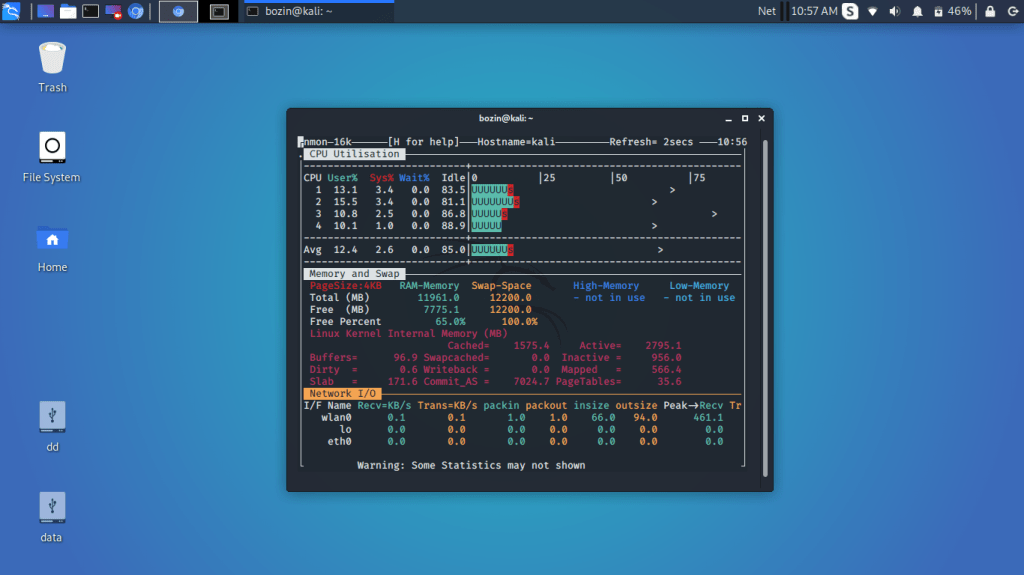
ဒါကတော့ command အညွှန်းလေးပါ
systemadmin တွေ အကြိုက်တွေ့စေမယ်လို့ ထင်ပါတယ်
monitoring tool တစ်ခုပါသူ့ရဲ့လုပ်ဆောင်ချက်တွေက
-CPU,Memory,Network,etc… စဖြင့် လက်ရှိလုပ်ဆောင်ချက်တွေကို
တိုက်ရိုက်မြင်တွေ့ရမှာပါ
ဒီtool လေးကို မသုံးခင် package ကိုတော့ install လုပ်ဖို့လိုမယ်ဗျ
Debian 
#apt install nmon
Fedora,Centos,etc…
#yum install nmon
Shortcut တွေကတော့ အောက်ကအတိုင်းပါ
example : cpu ရဲ့ လုပ်ဆောင်နေတဲ့ ဖြစ်စဥ်ကို ကြည့်ချင်ရင် ‘c’
ကို နှိပ်ရမယ်ပေါ့ ဒါဆိုရင် cpu ရဲ့ လုပ်ဆောင်နေတာတွေမြင်ရမှာပါ
 nmon keyboard shortcuts
Usage – #nmon
q – To stop and exit nmon.
h – To see quick help (hint) screen and press h again to remove the hints.
Use the following command to turn on or off stats:
c – See cpu stats.
m – See memory stats.
d – See disk stats.
k – See kernel stats.
n – See network stats.
N – See NFS stats.
j – See file system stats.
t – See top process.
V – See virtual memory stats.
. – See only busy disks/procs.
v – Verbose mode (display as Ok/warning/danger on screen).
#bnntech#GNU/Linux #systemadmin
Linux basic to Linux system administration class
 BNN TECH